

Interface overview
Awaiting review. Converted automatically from the retired kotahi.community documentation (archived 13 July 2026). The steps and screenshots have not yet been checked against a current Kotahi release and may be out of date. Converted from docs.kotahi.community/getting-started/interfaces.html.
In this section
Section titled “In this section”- A Look At All The Kotahi Interfaces
Kotahi has a number of screens or pages connected together that allow for the amazing versatility of workflows. From a very high level, the interconnected ‘spaces’ or pages look like the following.

Each of these is convered in detail in this documentation. Here is a brief overview:
- Dashboard - the starting page for most users where new submissions are created and associated research objects accessed.
- Submission page - where metadata and files for new submissions are provided.
- Manuscripts page - a configurable listing of all research objects in the system. Access controls can be customised based on workflow needs.
- Control page - where review cycles, tasks, and decisions are coordinated. Access can be limited or open depending on hierarchy preferences.
- Review page - the interface for reviewers to provide feedback on submissions.
- Production Page - enables output of publication-ready files like PDFs and author proofing.
- Settings - configuration options for the platform.
- CMS - controls for customising public-facing pages along with published content endpoints.
To get started with Kotahi, focus on learning the Dashboard, Manuscripts Page, and Control Page.
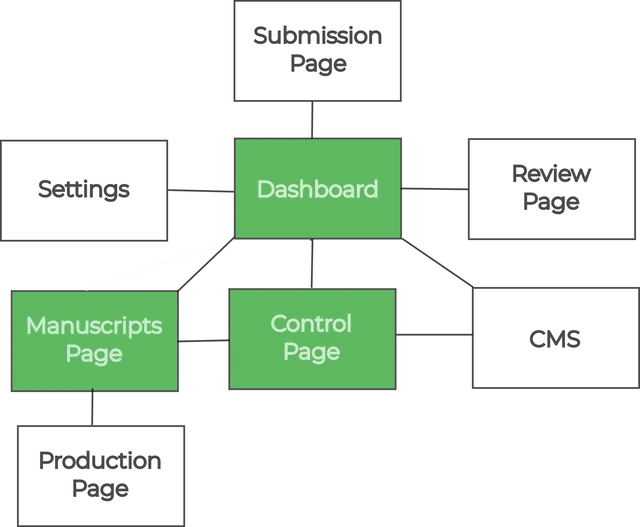
These spaces enable most core workflows and provide a general understanding of Kotahi’s capabilities. The modular architecture allows flexible arrangement of screens to meet a wide variety of use cases.